Uute paketitüüpide tutvustus
Päeviku- ja klassipakett on uued paketitüübid, mis võimaldavad senise kooli- ja erakasutaja paketi kõrval uusi viise Opiqu tellimiseks ja kasutamiseks.
Päevikupakett on koolikasutuseks mõeldud pakett, mille litsents annab õpilastele ja õpetajale ligipääsu ühele päeviku teosele. Mõeldud õpetajale, kes tahab õppetöös kasutada kindlaid teoseid.
Klassipakett on koolikasutuseks mõeldud pakett, mille litsents annab õpilastele ligipääsu kõigile koolipaketi (õpilase põhipakett) teostele ja õpetajale selle klassiastme teostele. Sobib kasutamiseks, kui kool ei võimalda koolipaketti, aga näiteks klassi lapsevanemad ja õpetajad ikkagi soovivad Opiqut lisaõppevarana kasutada.
Päeviku- ja klassipaketti saab tellida vaid õpetaja rollis kasutaja.
Tellimuse eest maksmiseks on kolm varianti:
- Õpetaja
- Õpilane või lapsevanem
- Määratud isikud (nt. mõni firma või lapsevanem).
Päeviku- ja klassipaketi saab tellida õpetaja oma olemasoleva päeviku õpilastele ja õpetajatele.
Päeviku- ja klassipaketi litsentsid tellitakse ja lisatakse nendele õpilastele ja õpetajatele, kes tellimise hetkel päeviku liikmed on. Tellimuse järgselt päevikusse õpilasi või õpetajaid lisades ei ole võimalik neile lisaks tellida uusi litsentse sama tellimuse piires, vaid tuleb teha uus tellimus, mis hõlmab kõiki päevikus olevaid õpilasi.
Klassipaketi õpetajate litsentside saamiseks, kes ei ole tellimuses oleva päeviku õpetajad, palume esialgu pöörduda Opiqu kasutajatoe poole. Tulevikus saab teiste õpetajate litsentse hallata tellimuse küljel tellimuse esitanud õpetaja.
Juhend õpetajale, kuidas päeviku- ja klassipaketti tellida
Tellimuse tegemiseks peab päevik, mille liikmetele litsentsid tellitakse, juba olemas olema kõigi sinna kuuluvate õpilaste ja õpetajatega.
- Tellimiseks tuleb avada oma nime alt avanevast menüüst „Minu tellimused“ > „Koosta tellimus“ ning valida litsentsitüübiks vastavalt kas päevikupakett või klassipakett.
- Valida päevikud, mille õpetajatele ja õpilastele soovitakse litsentse tellida. Kui päevikule on lisatud rohkem kui üks teos, saab ükshaaval valida, millise teose litsentsid tellida.
- Valida kehtivuse alguse kuupäev. NB! Kui tellimuse eest maksavad õpilased või määratud isikud, tuleks litsentsi algusaeg määrata varuga, sest osamaksete tasumine võib võtta aega. Tellimuse tasunud õpilase litsents hakkab kehtima määratud kuupäevast alates kohe peale maksmist, õpetaja litsents hakkab kehtima, kui kõigi õpilaste litsentside eest on arved tasutud.
- Valida litsentside kehtivus (paketti saab tellida 1-3 kuuks)
- Soovi korral saab lisada tellimusele õpetaja litsentse.
- Maksja valik. Tasumiseks on kolm võimalust.
- Maksavad päeviku õpilased või nende vanemad. Tellimus saadetakse õpilaste Opiqu esilehele kinnitamiseks. Summa jagatakse võrdselt kõigi päeviku õpilaste vahel ning iga õpilase esilehele ilmub teade tema osamakse kohta koos nupuga selle eest tasumiseks. Õpilase litsents lisatakse õpilasele kohe peale tema osamakse tasumist. Õpetajale lisatakse litsents siis, kui kõikide õpilaste osamaksed on tasutud.
- Maksavad määratud isikud. Sisestada tuleks maksjad, kellega on maksmine eelnevalt kokku lepitud, ja nende e-posti aadressid. Summa jagatakse võrdselt maksjate vahel ning igale neist saadetakse e-kiri lingiga tema osamakse tasumise lehele. Nii õpilastele kui õpetajale lisatakse litsentsid pärast kõikide osamaksete tasumist.
- Maksan ise. Maksmiseks saab kasutada enda või näiteks klassiraha. Tellimuse kinnitamine ja selle eest tasumine jätkub nagu erakasutaja tavapaketi tellimisel, kus saab tasuda pangalingi või kaardimaksega. Õpilastele ja õpetajale lisatakse litsentsid kohe pärast makse tasumist.
Tellimuse kokkuvõte ja olemasolevate litsentside hoiatusteated
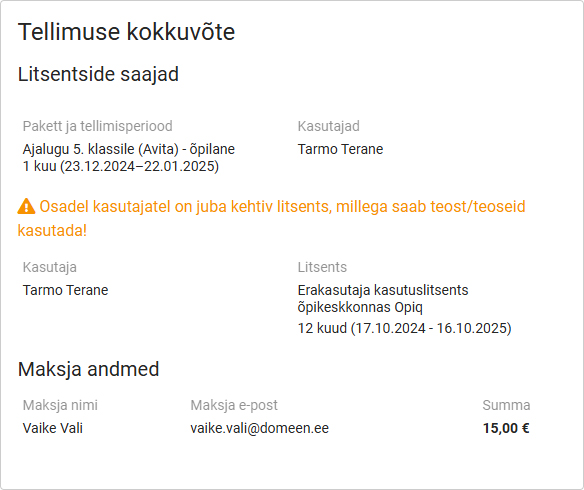
Enne tellimuse kinnitamist tuleks hoolikalt üle vaadata tellimuse kokkuvõte. Seal on kirjas litsentside saajad, milline pakett ja mis perioodiga kellele lisatakse. NB! Tellimust hiljem muuta ei saa!
Lisaks näidatakse tellimuse kokkuvõttes hoiatusteateid, kui kellelgi õpilastest või õpetajatest on juba litsents, mis annab ligipääsu vastavatele teostele. Kui nt mingi teise päevikuga on õpilastele juba klassilitsents ostetud, pole mõtet neile topelt litsentse osta.
Milliseid teoseid tellida saab?
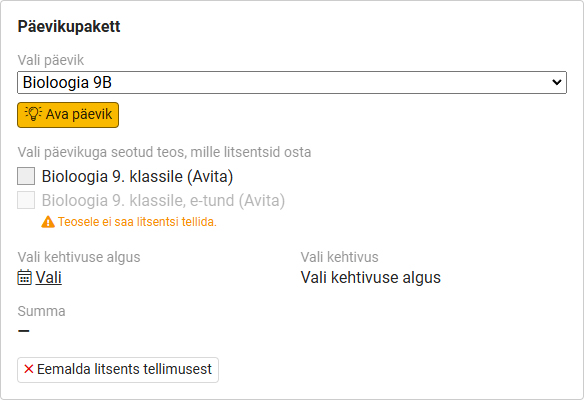
Päevikupaketi valikud
Päevikupaketiga saab osta litsentsid päevikuga seotud teostele. Ühe tellimusega saab osta litsentsi mitmele teosele, mis selles päevikus kasutusel on.
Klassipaketi valikud
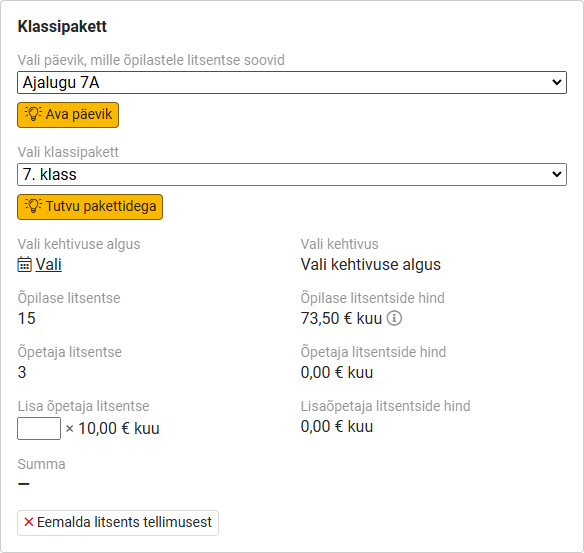
Klassipaketiga saab osta litsentsid päeviku õpilastele kõikidele õpilase põhipaketis olevatele teostele ning päeviku õpetajatele vastava klassiastme teostele. Ühe tellimusega saab osta ühe klassipaketi.
Kui litsentsitüübiks on valitud “Klassipakett”, siis tuleb “Koosta tellimus” osas täpsustada, millise päeviku ja millise klassiastme teoste litsentsi tellida soovitakse. Pärast klassipaketi valikut saab täpsustada litsentsi kehtivuse alguse, kehtivuse ja lisada soovi korral õpetaja litsentse, kui neid soovitakse rohkem kui kolmele õpetajale. Klassipaketis sisaldub kolme õpetaja tasuta litsents, kuid tingimusel, et kõik kolm õpetajat on tellimise hetkel päevikusse lisatud.
Lisainfot saab küsida kirjutades info@starcloud.ee ja helistades +372 5323 7793. Vaata teateid ka meie Facebooki lehelt.